> ## Documentation Index
> Fetch the complete documentation index at: https://interfere-mintlify-cfd02067.mintlify.site/llms.txt
> Use this file to discover all available pages before exploring further.
# The problem view
> Everything you need to understand and fix one problem, with a timeline at its heart.
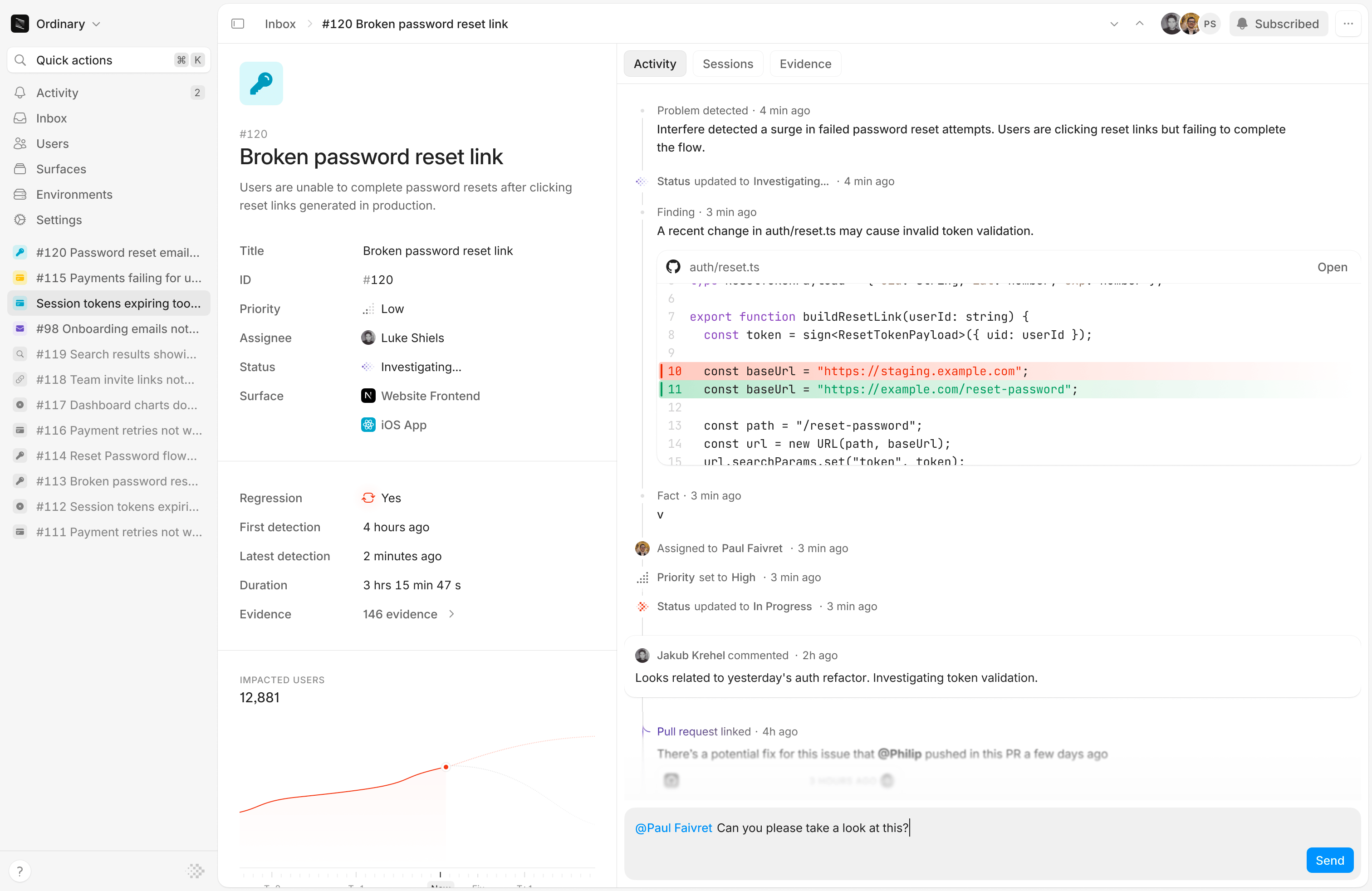
Open a [problem](/concepts#problem) from your [Inbox](https://interfere.com/~/*) and you get the full picture in one place: what happened, who it hit, why, and what to do about it. This is where most of your time in Interfere is spent.
 ## At a glance
Every problem opens with a plain-language **title and description** that Interfere writes for you, so you know what you're looking at before reading a single stack trace. Alongside it you'll find:
* **The evidence behind it.** Every [piece of evidence](/concepts#evidence) that rolled up into this problem, linked so you can drill into specific occurrences.
* **Who it affected.** How many users hit it and how often, and the [users](https://interfere.com/~/*/users) themselves, so you can gauge impact instead of guessing.
* **First seen and last seen.** *First seen* is when Interfere recorded the earliest piece of evidence for this problem. It tells you whether the problem just appeared or has been running for a while. *Last seen* is the most recent occurrence, so you can tell whether it's still happening or has gone quiet. Together they bound the window the problem has been active. When a resolved problem returns as a [regression](/concepts#regression), *last seen* advances to the new occurrence and *first seen* stays put.
## The timeline
The timeline is the heart of the problem view: one chronological thread of the investigation and the work around it.
* **It updates itself.** Interfere advances the [status](/concepts#statuses) as it investigates and only pulls you in when it needs a human decision, like confirming a likely regression. You're not babysitting a queue.
* **Root cause, code, and facts.** The timeline lays out what Interfere found: the likely cause, the relevant code, and the facts behind it, so the reasoning is in front of you rather than hidden.
* **Linked pull requests.** Pull requests that relate to the problem appear on the timeline, so a fix in flight sits next to the problem it addresses.
* **Relevant sessions.** Jump straight to the [session replays](https://interfere.com/~/*/users) where the problem actually appeared, so you spend your time on where it shows up in a real user's flow.
* **Filtering.** Filter the timeline down to the part you care about when there's a lot going on.
## Work the problem
You don't file problems, and you rarely set their status by hand. Interfere surfaces them from your events and moves them through their [statuses](/concepts#statuses) on its own as it investigates. Your job is to direct and decide. From the problem view you can:
* **Assign it.** Hand the problem to the right teammate. Press a to open the assignee picker.
* **Set priority.** Mark it high, medium, or low so the team knows what to pick up first. Press p to set it.
* **Edit the title or description.** Interfere writes both for you. Tighten either one if you want it to read a certain way for your team.
* **Discuss inline.** Comment on the timeline and @mention people to pull in whoever's needed, from the engineer who owns the code to a designer or PM.
* **Subscribe.** Follow a problem to get its updates, or unsubscribe to step back. Press s to toggle it.
* **Dismiss it.** When a problem isn't worth acting on, dismiss it to clear it from your active list. Interfere keeps the record in case it returns.
* **Archive it.** Remove a problem you don't want to see at all.
Interfere handles the rest of the lifecycle. It marks a problem resolved once the issue stops recurring, and reopens it as a [regression](/concepts#regression) if it comes back on a later release. You never mark something resolved by hand.
## Get notified
Interfere notifies the right people when a problem needs them. Choose where those notifications go in [Alerts](https://interfere.com/~/*/settings/alerts). Mentions and assignments also reach you as Slack messages, and you can keep the conversation there. See [Slack](/integrations/slack) or open the [Slack integration](https://interfere.com/~/*/settings/integrations/slack).
## At a glance
Every problem opens with a plain-language **title and description** that Interfere writes for you, so you know what you're looking at before reading a single stack trace. Alongside it you'll find:
* **The evidence behind it.** Every [piece of evidence](/concepts#evidence) that rolled up into this problem, linked so you can drill into specific occurrences.
* **Who it affected.** How many users hit it and how often, and the [users](https://interfere.com/~/*/users) themselves, so you can gauge impact instead of guessing.
* **First seen and last seen.** *First seen* is when Interfere recorded the earliest piece of evidence for this problem. It tells you whether the problem just appeared or has been running for a while. *Last seen* is the most recent occurrence, so you can tell whether it's still happening or has gone quiet. Together they bound the window the problem has been active. When a resolved problem returns as a [regression](/concepts#regression), *last seen* advances to the new occurrence and *first seen* stays put.
## The timeline
The timeline is the heart of the problem view: one chronological thread of the investigation and the work around it.
* **It updates itself.** Interfere advances the [status](/concepts#statuses) as it investigates and only pulls you in when it needs a human decision, like confirming a likely regression. You're not babysitting a queue.
* **Root cause, code, and facts.** The timeline lays out what Interfere found: the likely cause, the relevant code, and the facts behind it, so the reasoning is in front of you rather than hidden.
* **Linked pull requests.** Pull requests that relate to the problem appear on the timeline, so a fix in flight sits next to the problem it addresses.
* **Relevant sessions.** Jump straight to the [session replays](https://interfere.com/~/*/users) where the problem actually appeared, so you spend your time on where it shows up in a real user's flow.
* **Filtering.** Filter the timeline down to the part you care about when there's a lot going on.
## Work the problem
You don't file problems, and you rarely set their status by hand. Interfere surfaces them from your events and moves them through their [statuses](/concepts#statuses) on its own as it investigates. Your job is to direct and decide. From the problem view you can:
* **Assign it.** Hand the problem to the right teammate. Press a to open the assignee picker.
* **Set priority.** Mark it high, medium, or low so the team knows what to pick up first. Press p to set it.
* **Edit the title or description.** Interfere writes both for you. Tighten either one if you want it to read a certain way for your team.
* **Discuss inline.** Comment on the timeline and @mention people to pull in whoever's needed, from the engineer who owns the code to a designer or PM.
* **Subscribe.** Follow a problem to get its updates, or unsubscribe to step back. Press s to toggle it.
* **Dismiss it.** When a problem isn't worth acting on, dismiss it to clear it from your active list. Interfere keeps the record in case it returns.
* **Archive it.** Remove a problem you don't want to see at all.
Interfere handles the rest of the lifecycle. It marks a problem resolved once the issue stops recurring, and reopens it as a [regression](/concepts#regression) if it comes back on a later release. You never mark something resolved by hand.
## Get notified
Interfere notifies the right people when a problem needs them. Choose where those notifications go in [Alerts](https://interfere.com/~/*/settings/alerts). Mentions and assignments also reach you as Slack messages, and you can keep the conversation there. See [Slack](/integrations/slack) or open the [Slack integration](https://interfere.com/~/*/settings/integrations/slack).