

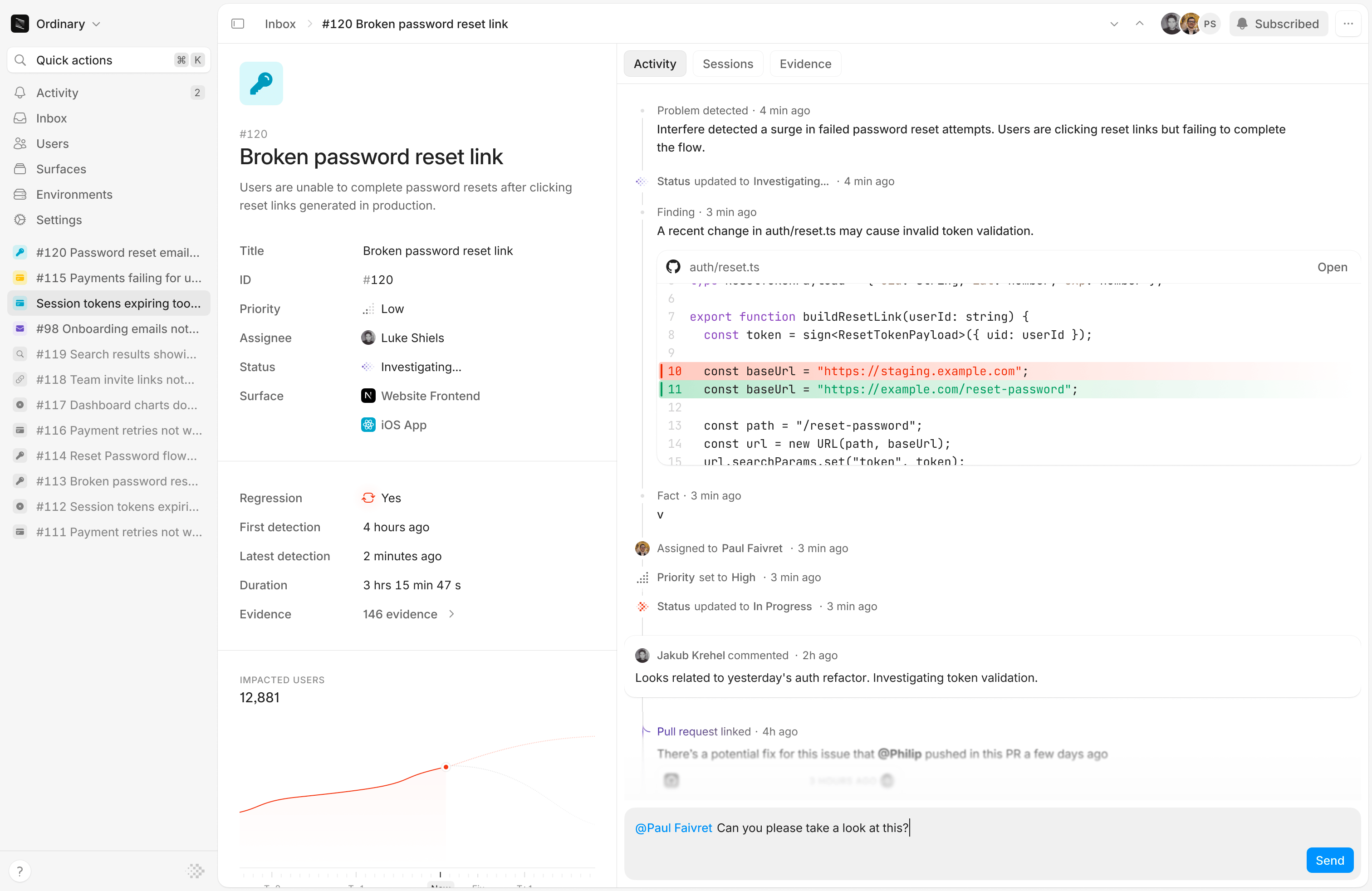
At a glance
Every problem opens with a plain-language title and description that Interfere writes for you, so you know what you’re looking at before reading a single stack trace. Alongside it you’ll find:- The evidence behind it. Every piece of evidence that rolled up into this problem, linked so you can drill into specific occurrences.
- Who it affected. How many users hit it and how often, and the users themselves, so you can gauge impact instead of guessing.
- First seen and last seen. First seen is when Interfere recorded the earliest piece of evidence for this problem. It tells you whether the problem just appeared or has been running for a while. Last seen is the most recent occurrence, so you can tell whether it’s still happening or has gone quiet. Together they bound the window the problem has been active. When a resolved problem returns as a regression, last seen advances to the new occurrence and first seen stays put.
The timeline
The timeline is the heart of the problem view: one chronological thread of the investigation and the work around it.- It updates itself. Interfere advances the status as it investigates and only pulls you in when it needs a human decision, like confirming a likely regression. You’re not babysitting a queue.
- Root cause, code, and facts. The timeline lays out what Interfere found: the likely cause, the relevant code, and the facts behind it, so the reasoning is in front of you rather than hidden.
- Linked pull requests. Pull requests that relate to the problem appear on the timeline, so a fix in flight sits next to the problem it addresses.
- Relevant sessions. Jump straight to the session replays where the problem actually appeared, so you spend your time on where it shows up in a real user’s flow.
- Filtering. Filter the timeline down to the part you care about when there’s a lot going on.
Work the problem
You don’t file problems, and you rarely set their status by hand. Interfere surfaces them from your events and moves them through their statuses on its own as it investigates. Your job is to direct and decide. From the problem view you can:- Assign it. Hand the problem to the right teammate. Press a to open the assignee picker.
- Set priority. Mark it high, medium, or low so the team knows what to pick up first. Press p to set it.
- Edit the title or description. Interfere writes both for you. Tighten either one if you want it to read a certain way for your team.
- Discuss inline. Comment on the timeline and @mention people to pull in whoever’s needed, from the engineer who owns the code to a designer or PM.
- Subscribe. Follow a problem to get its updates, or unsubscribe to step back. Press s to toggle it.
- Dismiss it. When a problem isn’t worth acting on, dismiss it to clear it from your active list. Interfere keeps the record in case it returns.
- Archive it. Remove a problem you don’t want to see at all.